ATR-Multiplier
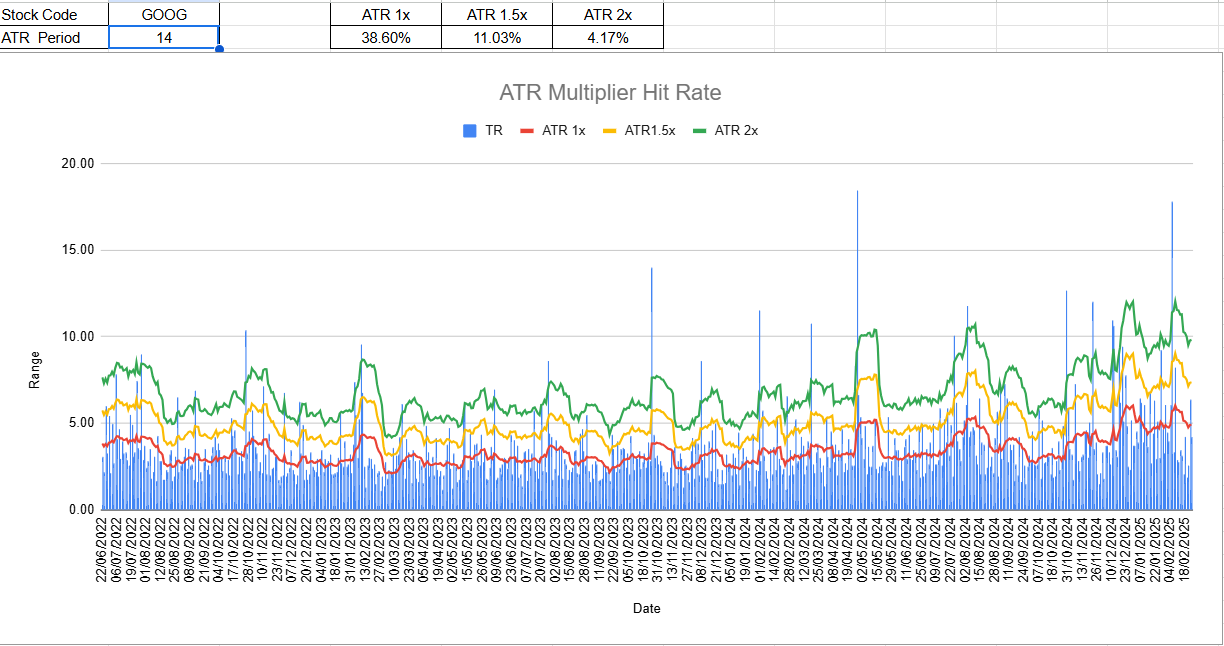
This Google Sheets template provides a comprehensive way to analyze the Average True Range (ATR) multiplier hit rates for any selected stock over a specified ATR period. By entering a stock code and the desired ATR period, the spreadsheet automatically computes the True Range (TR) for each day and compares it against multiple ATR thresholds—specifically 1×, 1.5×, and 2× ATR levels.
The dynamic chart displays the TR as a bar series alongside the ATR multiplier lines, making it easy to visually gauge how often the daily range surpasses each ATR multiple. The template also calculates hit-rate probabilities (occurrence rates) for each threshold, revealing how frequently the trading range exceeds certain volatility benchmarks. These insights can help you fine-tune stop-loss placements, manage risk, and get a better feel for the stock’s typical price movements.
SpreadsheetUsage:
- Select a stock symbol (e.g., GOOG) and choose an ATR period (e.g., 14).
- The tool calculates the stock’s daily trading range (TR) and plots it as bars on the chart.
- Lines are drawn for ATR 1×, ATR 1.5×, and ATR 2× to show different possible moves.
- At the top, you’ll find the probability of the trading range exceeding each ATR multiple. This helps assess how often (historically) the price moves beyond certain volatility thresholds.