Relative Moving Average (RMA)
Function Syntax
=RMA(data, period) data(array):
Range of columns containing the date, Open, high, Low, close, volume data.period(number):
Number of periods (days) over which the RMA is calculated
Returns:
A two-column array of dates and their corresponding RMA values.
Google Sheets Output Example
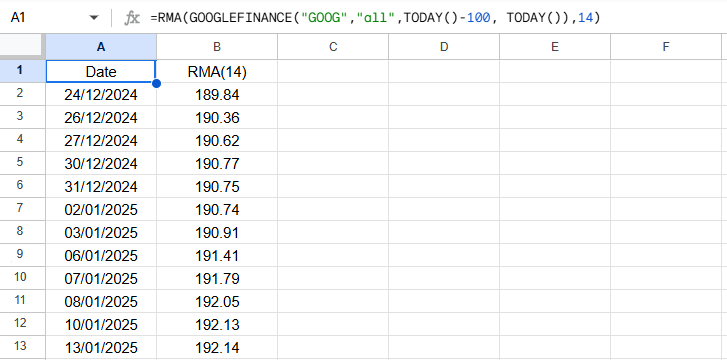
Below is an example of the resulting array when applying the custom RMA() function in Google Sheets
Apps Scripts Code
Here’s the full Google Apps Script code.
Paste this directly into the Google Sheets Apps Script editor (Extensions → Apps Script):
rma.gs
/**

 * Calculates the Relavtive Moving Average (RMA) for a given dataset and period.

 *

 * @param {array} data - an array where the first column is the  dates, and subsequent columns for  open, high, low, close and volume.

 * @param {number} period The number of periods to calculate the RMA, e.g., 14 for a 14-day RMA.

 * @returns {Array} the RMA values along with corresponding dates.

 * @customfunction

 */


function RMA(data, period) {

  //Check number of arguments

  if (arguments.length !== RMA.length) {

    throw new Error(`Wrong number of arguments. Expected ${RMA.length} arguments, but got ${arguments.length} arguments.`);

  }


  const processedData = getData(data);

  const dates = processedData.slice(1).map(row => row[0]); // Extract dates

  const closePrices = processedData[0].length === 2

    ? processedData.slice(1).map(row => row[1]) // For 2-column arrays, use the second column

    : processedData.slice(1).map(row => row[4]); // Default: use index 4 for close price


  // Initialize an array to store EMA values with corresponding dates

  let results = [["Date", `RMA(${period})`]]; // Include headers


  // Calculate the multiplier for RMA calculation

  const multiplier = 1 / period;


  // Calculate SMA for the first n data points

  let sum = 0;

  for (let i = 0; i < period; i++) {

    sum += closePrices[i];

  }

  let sma = sum / period;


  // The first RMA

  results.push([dates[period - 1], sma]);


  // Calculate RMA for the remaining data points

  for (let i = period; i < closePrices.length; i++) {

    const currentClose = closePrices[i];

    const prevRMA = results[results.length - 1][1];

    const currentRMA = (currentClose - prevRMA) * multiplier + prevRMA;


    // Append the current date and RMA to the results array

    results.push([dates[i], currentRMA]);

  }


  return results;

}


/**

 *

 * @param {Array<Array>} data - A 2D array of cell values to process. The first row should contain headers.

 * @returns {Array<Array>} - A 2D array where the first row contains headers and subsequent rows contain processed data.

 *

 * @customfunction

 *

 */


function getData(data) {

  if (!data || data.length === 0) {

    throw new Error("Input data is empty or invalid.");

  }


  // Check if the first row contains headers

  const headers = Array.isArray(data[0]) && data[0].every(item => typeof item === "string")

    ? data[0]

    : null;


  if (!headers) {

    // If no headers, assume the first column is the date column and process data

    return data.map(row => row.map((value, index) => {

      return index === 0 ? new Date(value) : parseFloat(value);

    }));

  }


  // Process rows with headers

  return [headers, ...data.slice(1).map(row => headers.map((header, index) => {

    const key = header.toLowerCase();

    return key === "date" ? new Date(row[index]) : parseFloat(row[index]) || row[index];

  }))];

}
Last updated on