Yahoo Finance (YFINANCE)
Function Syntax
=YFINANCE(ticker, startDate, endDate, interval) -
ticker(string): The stock ticker symbol for the desired company or asset. (Ticker must match Yahoo Finance formatting!) -
startDate(Date): The start date for the historical data retrieval. -
endDate(Date): The end date for the historical data retrieval. -
interval(string): - Optional
The interval at which the data is aggregated (e.g., “1d” for daily data, “1wk” for weekly data, “1mo” for monthly data).
Returns:
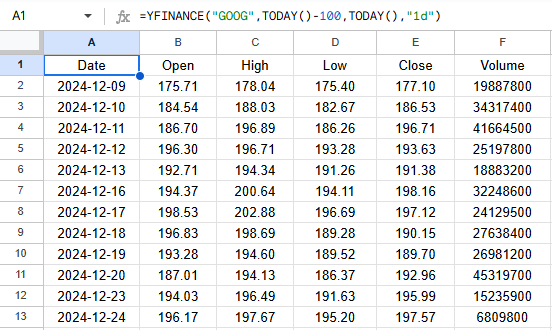
A 6-column array of Dates and their corresponding Open, High, Low, Close, Volume values.
Google Sheets Output Example
Below is an example of the resulting array when applying the custom YFINANCE() function in Google Sheets
Apps Scripts Code
Here’s the full Google Apps Script code.
Paste this directly into the Google Sheets Apps Script editor (Extensions → Apps Script):
/**
 * Fetch historical stock data from Yahoo Finance and return it as a 2D array.
 *
 * @customfunction
 * @param {ticker} ticker - The stock ticker symbol (e.g., "AAPL").
 * @param {date} startDate - The start date for the data (e.g., "2020-01-01").
 * @param {date} endDate - The end date for the data (e.g., "2023-12-31").
 * @param {string} interval - The data interval (e.g., "1d", "1wk", "1mo"). Defaults to "1d".
 * @returns {Array[]} - A 2D array of stock data including Date, Open, High, Low, Close, and Volume.
 */
function YFINANCE(ticker, startDate, endDate, interval = "1d") {
  // Validate inputs
  if (!ticker || !startDate || !endDate) {
    throw new Error("Parameters ticker, startDate, and endDate are required.");
  }

  // Convert dates to UNIX timestamps
  const period1 = Math.floor(new Date(startDate).getTime() / 1000);
  const period2 = Math.floor(new Date(endDate).getTime() / 1000);

  // Yahoo Finance chart endpoint
  const url = `https://query2.finance.yahoo.com/v8/finance/chart/${ticker}?period1=${period1}&period2=${period2}&interval=${interval}&events=history`;

  try {
    // Fetch data
    const response = UrlFetchApp.fetch(url);
    const json = JSON.parse(response.getContentText());

    // Parse JSON data
    const timestamps = json.chart.result[0].timestamp;
    const quotes = json.chart.result[0].indicators.quote[0];

    // Combine into a 2D array
    const rows = [["Date", "Open", "High", "Low", "Close", "Volume"]];
    timestamps.forEach((timestamp, index) => {
      const date = new Date(timestamp * 1000).toISOString().split("T")[0];
      rows.push([
        date,
        quotes.open[index],
        quotes.high[index],
        quotes.low[index],
        quotes.close[index],
        quotes.volume[index]
      ]);
    });

    return rows; // Return the data as a 2D array
  } catch (error) {
    throw new Error("Error fetching data: " + error.message);
  }
}